PhotoSweep
Find the biggest videos and old screenshots in your photo library and delete them to free iPhone storage.
PhotoSweep shows how much free space your iPhone has and what in your photo library is taking it: videos sorted by size, and the Screenshots album. You pick what to delete, and iOS keeps it in Recently Deleted for 30 days. For space no app is allowed to clear, such as other apps' caches and System Data, it gives step-by-step instructions instead of pretending.
In the App Store · iPhone · Free, no in-app purchases
What it does
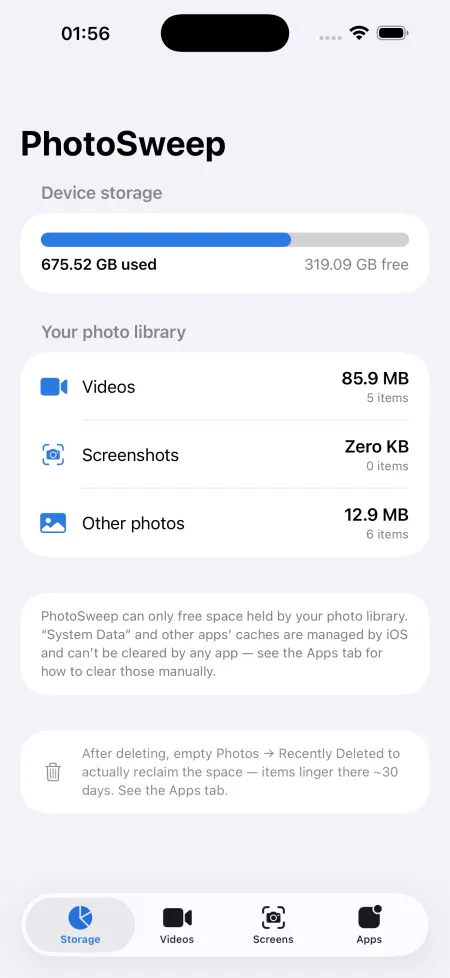
Storage dashboard
Free space on the device next to a breakdown of the photo library into videos, screenshots and other photos.
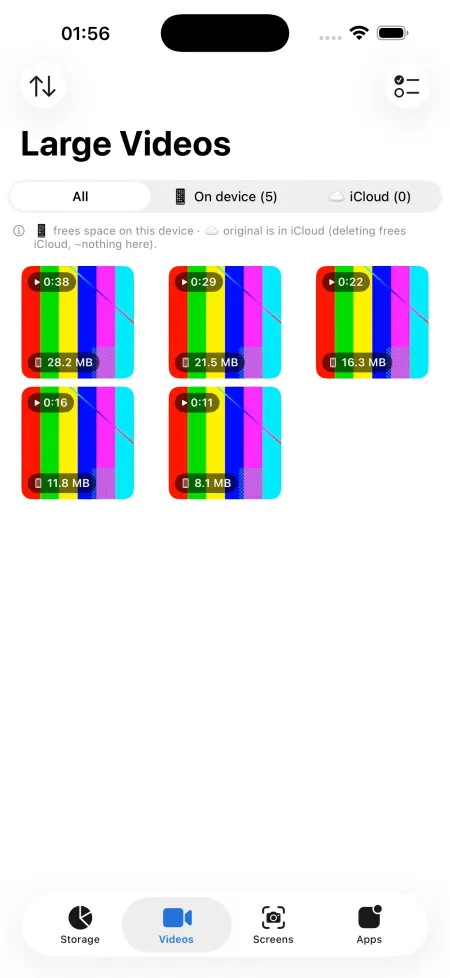
Large videos, sorted by size
Every video with a thumbnail and its size, largest first. Select several and delete them in one go.
On device or in iCloud
A filter shows which videos are stored on the phone and which are already offloaded to iCloud, because deleting an offloaded video frees iCloud space, not phone space.
Preview and share before deleting
Open any item to play or view it, then share or export it through the iOS share sheet before you remove it.
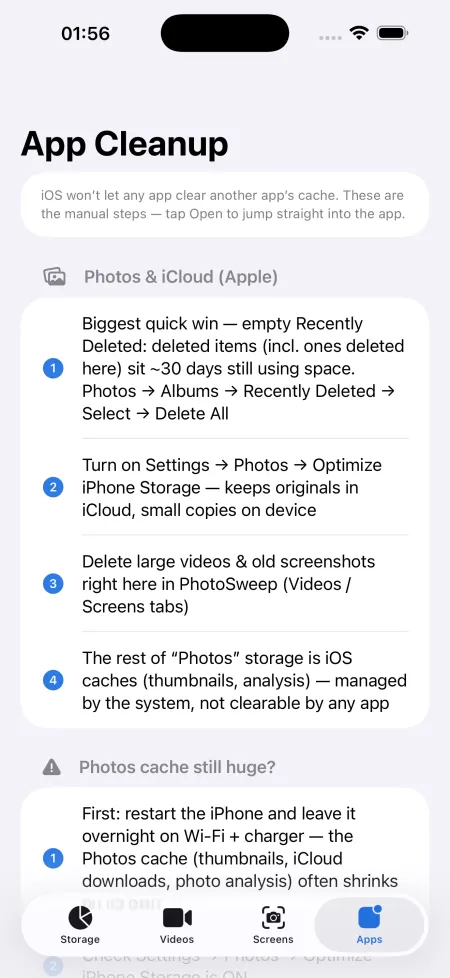
App cleanup guide
Steps and a shortcut to open 11 storage-heavy apps (Google Photos, Telegram, Instagram, WhatsApp, TikTok, YouTube, Safari, Spotify, Snapchat and more), plus Apple Photos and iCloud tips, since iOS does not let any app clear another app's cache.
Privacy
Your photos and videos are read and deleted on the iPhone through Apple's Photos framework and are never uploaded. The one thing that leaves the phone is an anonymous launch count sent to our own counter.
- Account: none. The app has no sign-in and no account.
- Reaches us: An anonymous launch count: the event "app launched", the app version, a timestamp and a random install id (see Analytics)
- Other services: Apple iCloud Photos (via PhotoKit, not our server)
FAQ
Can PhotoSweep clear Telegram, Instagram or WhatsApp cache?
No. iOS keeps every app's files sealed from other apps, so no App Store app can clear another app's cache or System Data. PhotoSweep opens those apps for you and lists the steps to clear their cache inside each one.
What happens to what I delete?
It goes to Recently Deleted in Photos. iOS asks you to confirm first, and you can restore items for 30 days.
Why did deleting a big video free almost no space?
With Optimize iPhone Storage on, the original lives in iCloud and only a small copy is on the phone. The iCloud filter shows these; deleting them frees iCloud space instead.
Does it cost anything?
No. It is free, with no in-app purchases and no ads.
Do my photos get uploaded?
No. Photos and videos are only read and deleted on the phone. The app sends one anonymous launch count with a random install ID, nothing about your media.